


6 steps to apply for Instagram verification
Posted by ludicloaded on August 29, 2023
0



It only takes a few minutes to fill out the Instagram verification application. We found a few things worked differently than Instagram says they do, though.
Step 1: Log into your Instagram account and tap your profile picture
Make sure you’re doing this from the mobile app. Some features aren’t available from a desktop.
Step 2: Tap the Hamburger icon in the upper right

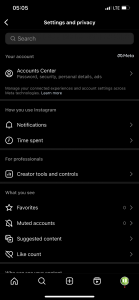
Step 3: Go to Settings and Privacy
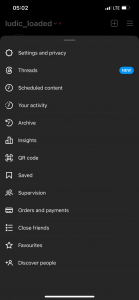
Step 4: Go to Creator Tools and Controls
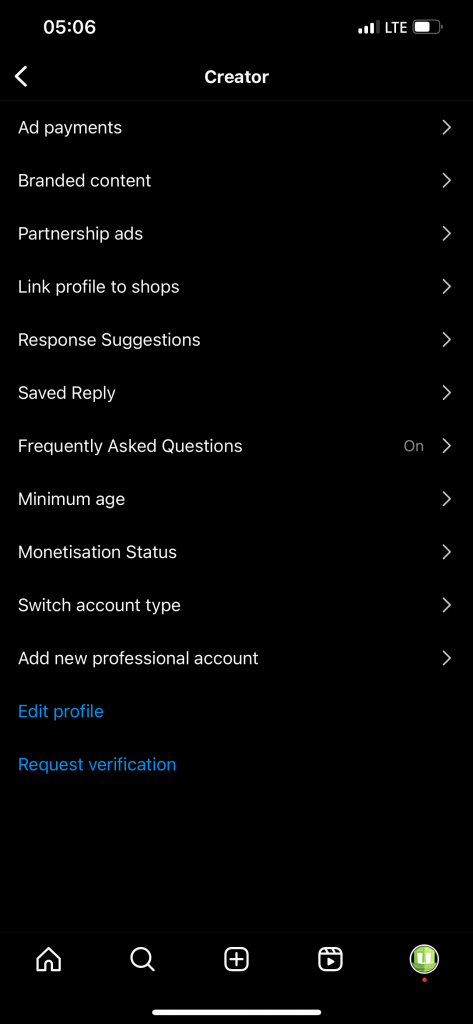
Step 5: Tap Request Verification
Step 6: Fill out the application
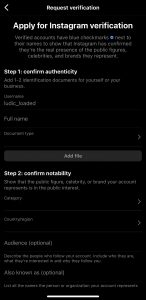
There are a few sections to complete.
First, fill in your name and submit a document proving your identity. Instagram says you can use a driver’s license, tax filing, or recent utility bill among a few other choices.
Then select a category like sports, music, or fashion and the country you’re best known in. You can also describe your audience (who they are, why they follow you, etc.).
Finally, add links to news articles or social media accounts that show that you’re in the public interest. This is where you’ll prove your notoriety.
Click “Submit” and you’re done!
After a few days, and maybe up to a month, Instagram will send their response to your notifications tab.
Use these tips to get verified on Instagram
Filling out the Instagram verification form is easy. The hard part is getting approved. These tips will help you get the green light for your new blue badge.


READ ALSO 👇



[Music] Davido – Be There Still
Download Here

